Tekton Long-Term Log Storage
Tekton Results aims to help users logically group CI/CD workload history and separate out long term result storage away from the Pipeline controller. This allows you to:
- Provide custom Results metadata about your CI/CD workflows not available in the Tekton TaskRun/PipelineRun CRDs (for example: post-run actions).
- Group related workloads together (e.g. bundle related TaskRuns and PipelineRuns into a single unit).
- Make long-term result history independent of the Pipeline CRD controller, letting you free up etcd resources for Run execution.
- Store logs produced by the TaskRuns/PipelineRuns so that completed Runs can be cleaned to save resources.
Long-Term Log Access Workflow
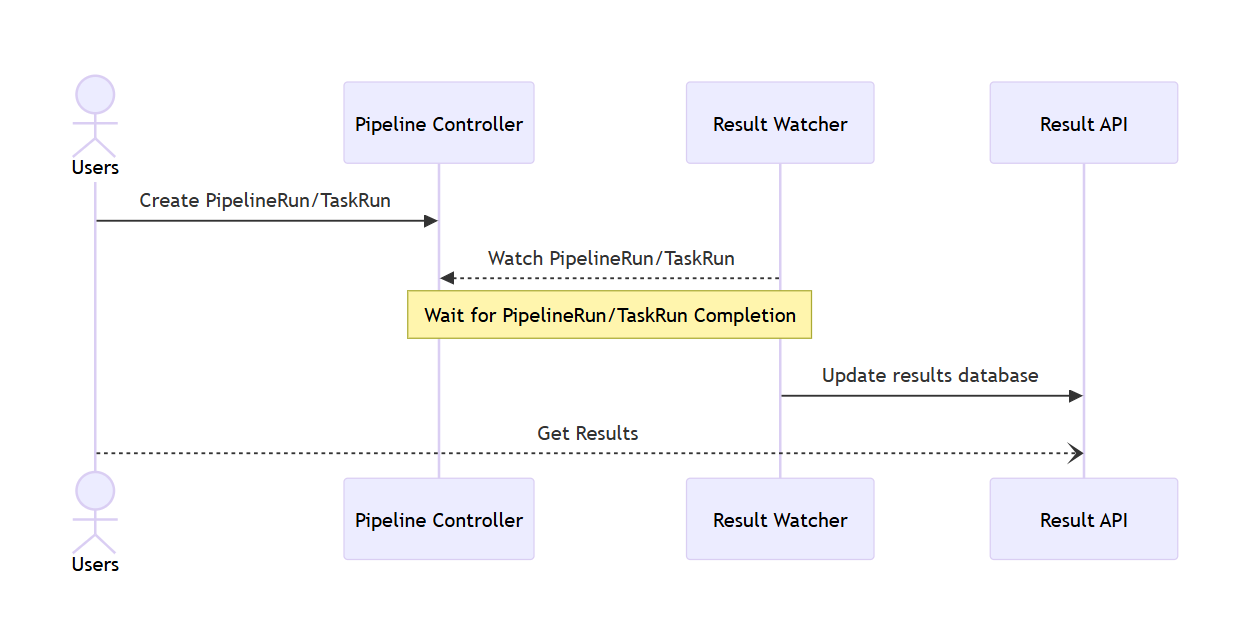
The following diagram illustrates the workflow for accessing long-term logs for pipelines in the KubeRocketCI Portal:
Install Tekton Results
Tekton Results is deployed as part of the Tekton Pipelines installation. For installing Tekton Pipelines, we recommend using the add-ons approach. Here's an example of how to configure values.yaml before installation:
tekton:
    createNamespace: true
    enable: true
    namespace: tekton-pipelines
Configuration
To configure long-term log storage for pipelines in the KubeRocketCI Portal, follow the steps below:
-
Storage sizes in the results-pg.yaml file define the allocated volumes for the Tekton Results PostgreSQL cluster:
-
Database instance storage
- Path:
spec.instances.dataVolumeClaimSpec.resources.requests.storage - Default:
2Gi - Description: Specifies the size of the main PostgreSQL data volume.
- Path:
-
Backup repository storage
- Path:
spec.backups.pgbackrest.repos.volume.volumeClaimSpec.resources.requests.storage - Default:
2Gi - Description: Specifies the size of the pgBackRest backup repository volume.
- Path:
-
-
Storage and retention settings in the results.yaml file define how Tekton Results logs and data are stored and managed:
-
Log storage size
- Path:
PersistentVolumeClaim.spec.resources.requests.storage - Default:
5Gi - Description: Specifies the allocated disk size for storing pipeline logs.
- Path:
-
Retention period
- Path:
ConfigMap.data.defaultRetentionintekton-results-config-results-retention-policy - Default:
"30"days - Description: Defines how long log files are retained before being automatically removed.
- Path:
-
Cleanup schedule
- Path:
ConfigMap.data.runAtintekton-results-config-results-retention-policy - Default:
"5 5 * * 0" - Description: Specifies the cron expression that determines when automated log cleanup runs (every Sunday at 5:05 AM).
- Path:
-
The retention policy agent removes only database records from PostgreSQL. It does not delete associated log files stored on persistent volumes, S3, or GCS backends. As a result, log data may remain on disk and consume storage even after the corresponding records are expired.
Users are currently responsible for manually cleaning up unused log files from the underlying storage backends.